Wallet Analytic with Dune
Introduction
This guide helps wallet builders track and analyze their users accounts' activity on the Stellar network using Dune Analytics. This will allow you to build a dashboard to track metrics like total accounts, account growth over time, specific asset balances, payment activity and volume, and smart contract interactions.
Prerequisites
- A Dune account (free tier includes 2,500 credits/month)
- Basic SQL knowledge
- Your wallet's sponsor account addresses (if using account sponsorship)
- Or your wallet's identifying characteristics (contract IDs, specific asset patterns, etc.)
Overview
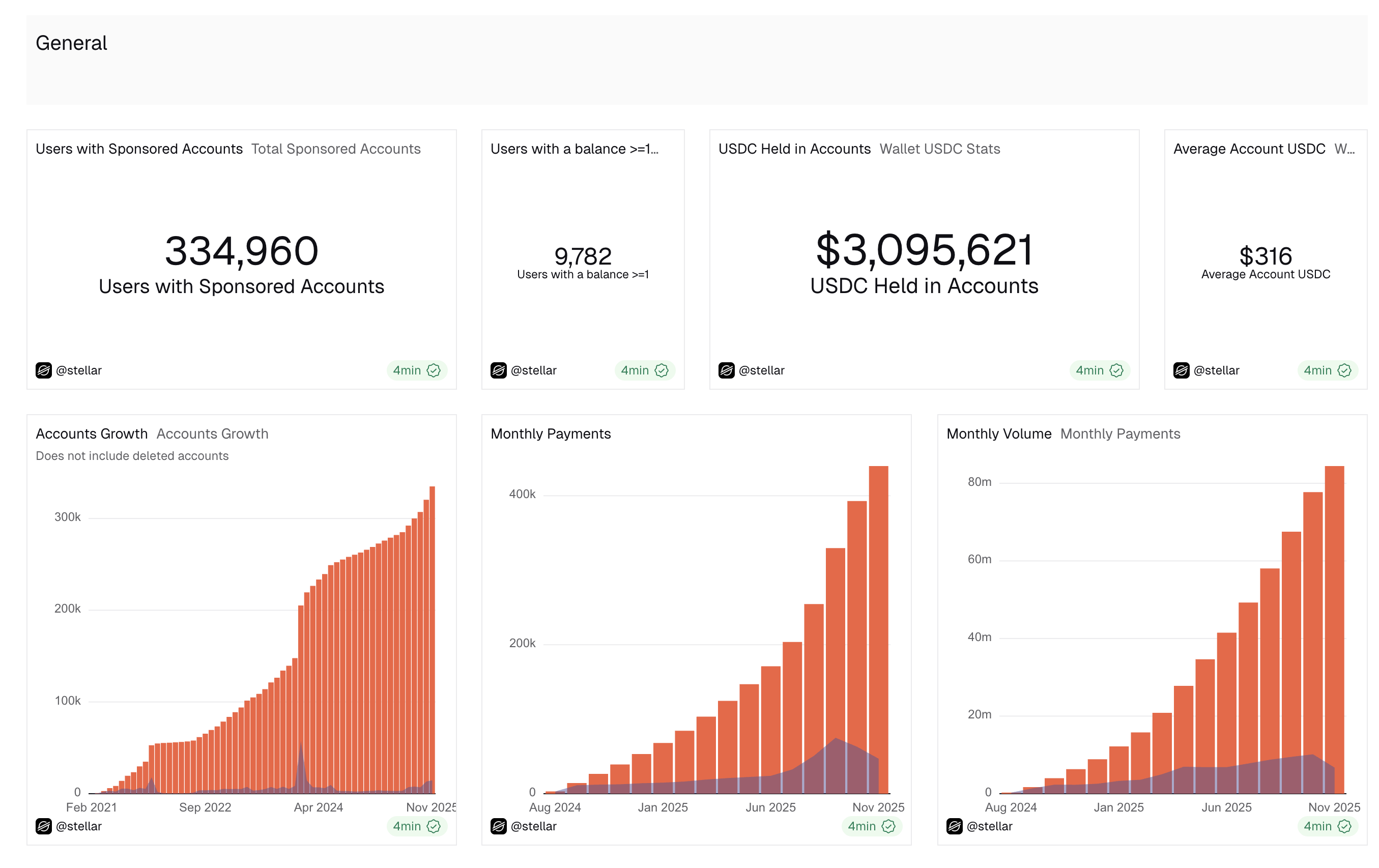
This guide covers core wallet metrics:
- Total user accounts
- Account growth over time
- USDC balances
- Payment activity and volume
Cost Considerations
Queries in this guide run either on Free or Medium Dune credits. Running the provided example queries would still fit within Dune's free tier. For more complex dashboards, consider upgrading to a paid plan.
Step 1: Identify Your Wallet's Accounts
The foundation of wallet analytics is identifying which accounts belong to your wallet. Choose the method that fits your architecture:
Option A: Sponsored Accounts
If your wallet sponsors user accounts, this is the most reliable method:
-- Replace the sponsor addresses with your wallet's sponsor account(s)
WITH wallet_sponsored_accounts AS (
    SELECT account_id
    FROM stellar.accounts
    WHERE sponsor IN (
        'YOUR_SPONSOR_ADDRESS_1',
        'YOUR_SPONSOR_ADDRESS_2',
        'YOUR_SPONSOR_ADDRESS_3'
    )
    GROUP BY account_id
),
accounts_current AS (
    SELECT
        account_id,
        MIN(closed_at) OVER(PARTITION BY account_id) AS account_created_at,
        deleted,
        sponsor,
        ROW_NUMBER() OVER (PARTITION BY account_id ORDER BY closed_at DESC) AS row_nr
    FROM stellar.accounts
    JOIN wallet_sponsored_accounts USING(account_id)
)
SELECT
    account_id,
    account_created_at
FROM accounts_current
WHERE sponsor IN (
    'YOUR_SPONSOR_ADDRESS_1',
    'YOUR_SPONSOR_ADDRESS_2',
    'YOUR_SPONSOR_ADDRESS_3'
)
AND deleted = FALSE
AND row_nr = 1
GROUP BY account_id, account_created_at
You can make this query Materialized in Dune and save it as result_[your_wallet_name]_accounts, with a nightly refresh. This creates a reusable table for other queries.
Option B: Other Identification Methods
If you don't use account sponsorship, consider:
- Tracking accounts that interact with your specific smart contracts
- Accounts created through your wallet's onboarding flow (if identifiable on-chain)
- Accounts holding your wallet-specific tokens
- Uploading a list of accounts to a Dune table
If you use deleted = FALSE clause in the Sponsored Accounts table, you will only get accounts that are not deleted in the following queries.
Step 2: Total Account Count
Simple query to show your total user count:
-- Query: Total Wallet Accounts
SELECT COUNT(*) AS total_accounts
FROM dune.[your_team_name].result_[your_wallet_name]_accounts
Setup: Create a single value visualization in Dune displaying this metric.
Step 3: Account Growth Over Time
Track how your user base grows monthly:
-- Query: Account Growth
SELECT
    DATE_TRUNC('month', account_created_at) AS month,
    COUNT(DISTINCT account_id) AS accounts_created,
    SUM(COUNT(DISTINCT account_id)) OVER (ORDER BY DATE_TRUNC('month', account_created_at)) AS cumulative_accounts
FROM dune.[your_team_name].result_[your_wallet_name]_accounts
WHERE account_created_at IS NOT NULL
GROUP BY 1
ORDER BY month DESC
Metrics Included:
accounts_created: New accounts created in each monthcumulative_accounts: Running total of all accounts
Setup: Create a line chart with month on X-axis and both metrics on Y-axis.
Step 4: Token Balances
Track your users' token holdings:
-- Query: Wallet USDC Balances
-- Make this Materialized

WITH latest_usdc_trustlines AS (
    SELECT
        account_id,
        balance,
        closed_at,
        deleted,
        ROW_NUMBER() OVER (PARTITION BY account_id ORDER BY closed_at DESC) AS rn
    FROM stellar.trust_lines
    WHERE asset_code = 'USDC'
        AND asset_issuer = 'GA5ZSEJYB37JRC5AVCIA5MOP4RHTM335X2KGX3IHOJAPP5RE34K4KZVN'
)
SELECT
    sa.account_id,
    CAST(tl.balance AS DOUBLE) AS usdc_balance,
    tl.closed_at AS balance_last_updated
FROM dune.[your_team_name].result_[your_wallet_name]_accounts sa
LEFT JOIN latest_usdc_trustlines tl
    ON sa.account_id = tl.account_id
    AND tl.rn = 1
    AND tl.deleted = FALSE
Consider making this query Materialized and save as result_[your_wallet_name]_usdc_balances.
This example is usind USDC as the token, but you can replace it with any token by updating the asset_code and asset_issuer.
Summary Statistics
-- Query: USDC Balance Summary
SELECT
    COUNT(*) AS total_users_with_gte_1_usdc,
    SUM(usdc_balance) AS total_usdc_held,
    AVG(usdc_balance) AS avg_balance_per_account
FROM dune.[your_team_name].result_[your_wallet_name]_usdc_balances
WHERE usdc_balance >= 1
Metrics:
- Users with at least 1 USDC
- Total USDC across all users
- Average USDC per account
Step 5: Monthly Payment Activity
Track token payment volume over time:
-- Query: Monthly USDC Payments
-- Shows monthly and cumulative volumes for last 15 months

WITH wallet_usdc_operations AS (
    SELECT
        DATE_TRUNC('month', ho.closed_at) AS month,
        ho.amount
    FROM stellar.history_operations ho
    JOIN dune.[your_team_name].result_[your_wallet_name]_accounts wallet
        ON ho."from" = wallet.account_id
    WHERE ho.type = 1  -- Payment operation
        AND ho.asset_code = 'USDC'
        AND ho.asset_issuer = 'GA5ZSEJYB37JRC5AVCIA5MOP4RHTM335X2KGX3IHOJAPP5RE34K4KZVN'
        AND ho.closed_at_date >= CURRENT_DATE - INTERVAL '15' MONTH
        AND ho.operation_trace_code LIKE '%Success'
)

SELECT
    month,
    COUNT(*) AS payments_count,
    SUM(COUNT(*)) OVER (ORDER BY month) AS cumulative_payments_count,
    SUM(amount) AS monthly_usdc_volume,
    SUM(SUM(amount)) OVER (ORDER BY month) AS cumulative_usdc_volume
FROM wallet_usdc_operations
GROUP BY month
ORDER BY month DESC
Metrics:
payments_count: Number of successful USDC paymentsmonthly_usdc_volume: Total USDC sent- Cumulative versions of both metrics
Setup: Create a combo chart with bars for monthly volume and lines for cumulative totals.
Customization Tips
1. Tracking Other Assets
Replace USDC with any asset by updating:
WHERE asset_code = 'YOUR_ASSET_CODE'
    AND asset_issuer = 'YOUR_ASSET_ISSUER'
For native XLM, use:
WHERE asset_type = 'native'
2. Different Time Ranges
Adjust date filters:
-- Last 30 days
WHERE closed_at_date >= CURRENT_DATE - INTERVAL '30' DAY

-- Last 6 months
WHERE closed_at_date >= CURRENT_DATE - INTERVAL '6' MONTH

-- Specific date range
WHERE closed_at_date BETWEEN CAST('2024-01-01' AS TIMESTAMP)
                          AND CAST('2024-12-31' AS TIMESTAMP)
3. Daily vs Monthly Aggregations
Change DATE_TRUNC granularity:
DATE_TRUNC('day', closed_at)    -- Daily
DATE_TRUNC('week', closed_at)   -- Weekly
DATE_TRUNC('month', closed_at)  -- Monthly
Performance Optimization
- Use Materialized Queries: For base account lists and frequently-joined data
- Filter Early: Apply WHERE clauses before JOINs when possible
- Limit Time Ranges: Don't query entire history unless necessary
- Index-Friendly Queries: Use exact matches on indexed columns (account_id, closed_at_date)
Next Steps
- Custom Metrics: Adapt these queries to track wallet-specific features
- Alerts: Set up Dune alerts for key thresholds (e.g., daily active users)
- API Access: Use Dune API to integrate data into your own dashboards